Anonymise on your computer, query the AI of your choice, read back locally with your real data.
Handing a raw document to AI means giving up personal data you no longer control. Tacitum first replaces each piece of data with a generic label ([NOM], [EMAIL], [ADRESSE]…), locally: the document you share becomes irreversible. You use it with the AI of your choice, then you read its answer back with the real names, on your machine only. Your real data never leaves your machine.
Free trial, AI Connector included · Windows · 7 formats · no sign-up
Subject: updating the file for James Cooper.
Mr James Cooper, born 12 April 1990, resides at 22 Baker Street, London.
Contact: +44 20 7946 0958 · james.cooper@example.com.
File handled by the Home Office.
Try first. Pay once.
Start with 10 free conversions, AI Connector included, no sign-up and no credit card. Then a one-time payment, no subscription and no cloud to pay for every month.
- All 7 formats: .docx, .pdf (text), .xlsx, .doc, .pptx, .txt, .csv
- Scanned documents: photos and image PDFs, read then anonymised
- Multiple files (or a whole folder) at once, formatting preserved
- 100% offline anonymisation: no document transmitted
- Updates to the purchased version included
- E-mail support & early access to new features
- Everything in the Tacitum licence: all 7 formats, scanned documents, batches, 100% offline, updates
- Claude Desktop or Codex Desktop asks Tacitum for your documents: no more copy-paste
- Review on your machine before sending; only the anonymised text goes out
- Answer read back in clear, Word or Excel files created with your real values, contract revision
- AI Connector with no auto-renewal: when it ends, you extend if you wish (€69 per year)
Want to try it first? The AI Connector works with the free trial. Already have the licence? It is added on its own from inside Tacitum: €69 for one year.
Buy the bundle — €148 See the AI Connector guide- Multi-user deployment & site licences
- AI tools & workflow automation integration
- Multi-file automation & internal workflows
- Dedicated support & tailored terms
No commitment · licence as a one-time payment · AI Connector for one year with no auto-renewal, in the bundle or as an option (€69) · free trial with no card, AI Connector included · multi-user pricing on request
Terms of sale in English · key points of the terms and privacy policy
All of Tacitum, free. AI Connector included.
10 free conversions · all anonymisation features, scanned documents included · AI Connector included in the trial: connect Claude Desktop or Codex Desktop and let it read your anonymised documents · 100% offline anonymisation. Download and try it: no account, no sign-up, no credit card.
Document languages
-
Included
- Français
- English
-
Free pack
- Español
- Deutsch
- Italiano
Pack downloaded once, when you ask for it · analysis 100% offline · Details in the user guide
Supported: each passage is analysed in its own language. The same value keeps the same code. Nothing to set up.
A document that circulates is a leak waiting to happen.
Handing a contract to ChatGPT, sending a case file to a subcontractor, e-mailing a document. Every time you share personal data, you're on the hook under the GDPR. And the cloud doesn't forgive.
Generative AI
Everyone uses ChatGPT or Copilot with their documents. But your prompts travel to foreign servers: a name, a social security number, an address. And the data is gone for good.
Subcontractors
Sharing an HR, legal or medical file multiplies the copies. Without anonymisation, every recipient becomes a risk.
GDPR fines
Up to €20 million or 4% of worldwide annual turnover. The best protection isn't to encrypt the data: it's to no longer hold it.
Seven formats. One window.
Drag a file or a whole folder. Tacitum detects, masks and rewrites, preserving the formatting. No blacked-out pages, no broken document. You can even keep certain categories (for example keep the dates).
- .docx Word
- .pdf PDF (text)
- .xlsx Excel
- .doc Older Word*
- .pptx PowerPoint
- .txt Text
- .csv Spreadsheet
* The .doc format requires Microsoft Word installed on the machine. Scanned documents (photos, image PDFs) are supported; reading quality depends on the scan itself (local recognition, optimised for French and English).
Hidden data travels too. Not with Tacitum.
A document is more than its text. The file keeps its author's name, the last person who edited it, the company, sometimes a case number or a client name in a hidden property, comments, and text deleted with Track Changes. Easy to forget at the moment of sending. Tacitum cleans all of it along with the content, on by default ("Remove metadata" box).
File properties
Word, Excel, PowerPoint: author, last modified by, company, manager, title, subject, keywords, category, and custom properties (client reference, case number) are cleared. So are the section titles the application remembers.
Comments and revisions
Comments, their authors' names and text deleted with Track Changes, which stays readable in the file until accepted, are removed in every case, even if you choose to keep the properties. A comment is content, not metadata.
In a PDF
The information dictionary (author, producer, dates), XMP metadata, annotations, page thumbnails and private application data (some programs store a copy of the source document there) are deleted. The file is rewritten in full: no earlier version survives inside the PDF.
Images are also removed by default (a photo or a logo can hold data that cannot be detected). Each option can be unticked in one click if you want to keep a file's properties or images.
With the AI Connector, Claude Desktop or Codex Desktop reads your anonymised documents. No copy-paste.
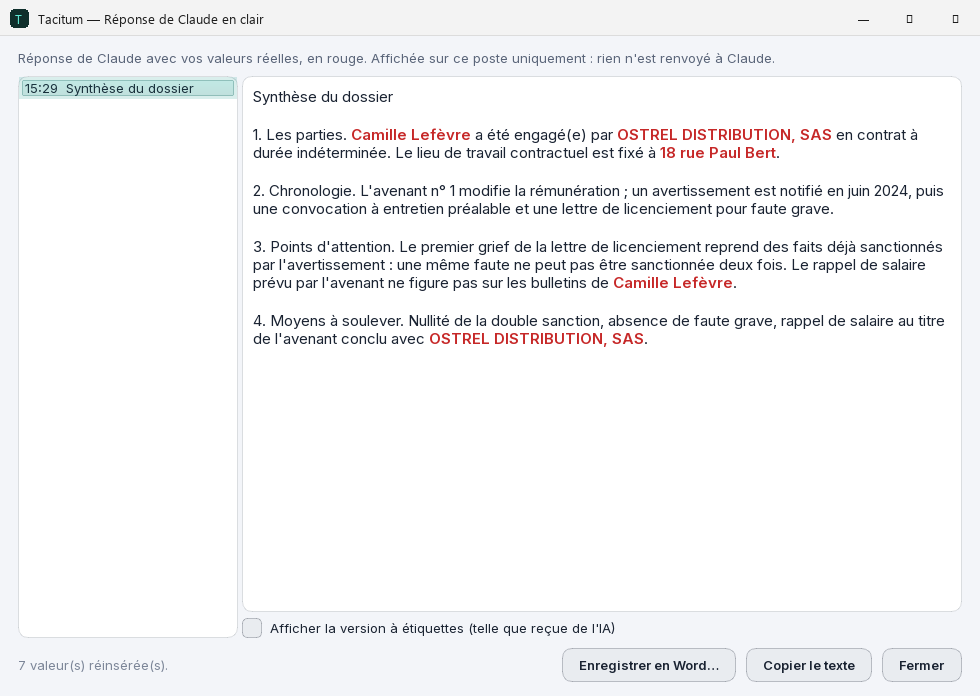
Plug Claude Desktop or Codex Desktop into Tacitum: you ask for an analysis, Tacitum anonymises the document on your machine and shows you what goes out, the assistant only receives the masked text, plus non-identifying details (anonymised document title, format, number of masked items per category). Its answer is read back in clear on your side, and can become a Word document with your real values.
- A whole folder at once: up to 30 documents analysed together, same codes everywhere, so the assistant can cross-reference them.
- You stay in control: the usual review window, then the "What the assistant will receive" screen. Nothing leaves before you click.
- Deliverables in clear, on your machine: restored answer, Word memo or Excel table with your real values, contract revision with tracked changes.
- Included in the free trial: connect your assistant right after installing; each document sent counts as one of the 10 free conversions.
- Then €69 for one year (no VAT applicable), on top of the Tacitum licence. No subscription, no automatic renewal. Claude Desktop and Codex Desktop (Windows).
Built for those who can't afford a mistake.
Lawyers & legal teams
Use AI with pleadings and exhibits, without ever breaching client confidentiality.
Human resources
CVs, contracts, personnel files: anonymised before any sharing or audit.
Healthcare professionals
Work on a patient file without ever exposing their identity.
Public sector
Open data, tenders, letters: publish without risking a leak.
Accountants
Share filings and payslips without handing over your clients' data.
SMEs & DPOs
GDPR compliance with no cloud, no subscription, no IT team.
What people ask us most.
Why the name “Tacitum”?
“Tacitum” comes from the Latin tacitus, “silent”, “left unsaid”. It is the root of the English word tacit (a tacit agreement, what goes without saying) and the name of the Roman historian Tacitus, famous for his concision. The software's whole purpose fits in that word: once processed, the document falls silent. In the file you share, each piece of personal data becomes a generic label and no table remains.
Can I use ChatGPT or Copilot with my documents without breaching the GDPR?
Yes, provided you anonymise the document before sending it. Everything you hand to a generative AI (ChatGPT, Claude, Copilot, Gemini, Mistral…) goes to servers you don't control: if it contains personal data, that is a transfer subject to the GDPR, and the responsibility remains yours. Tacitum replaces each piece of data locally with a typed, irreversible label. The text keeps all its meaning for the AI, but no longer contains anything identifying. You keep the speed, without the leak.
Is Tacitum really offline?
Yes, for your documents: Tacitum analyses and anonymises them 100% locally, on your Windows machine, and works even with no connection. No document and no content is sent over the Internet, no analysis API, no account. Only short technical exchanges, never a document, take place with our server (licence, updates, language packs downloaded at your request, usage measurement: see the privacy policy). With the optional AI Connector, only the anonymised text you have reviewed goes to your assistant.
Can I recover the original values? Does Restorable mode make the document reversible?
You can — the recipient never can. The document you share offers no way back to the real values: anonymisation is irreversible for whoever receives it. On your side, “Restorable mode”, on by default (you can turn it off at any time), keeps an encrypted table on your machine only (tied to your Windows account), automatically wiped and never shared. It lets you recover your values locally and read the AI's answer back with the real names. This table concerns only you and changes nothing about the shared document, which stays anonymous and impossible to re-identify, for the recipient as for the AI.
Which formats are supported?
Seven formats: .docx, .pdf (text, not scanned images), .xlsx, .doc (requires Microsoft Word installed), .pptx, .txt and .csv. You can process several files, or a whole folder, at once.
My documents are in Spanish, German or Italian: does Tacitum handle them?
Yes. French and English are included. For Spanish (Spain, Mexico, Argentina, Colombia, Chile), German (Germany, Austria, Switzerland) and Italian (Italy, Italian-speaking Switzerland), Tacitum downloads the language pack once, when you ask for it: free, a few dozen MB, from Settings → Document languages. It then recognises local identifiers (DNI, CURP, RUT, Steuer-ID, AHV, codice fiscale, partita IVA…) and applies labels in the document's language ([NOMBRE], [CORREO], [NAME], [E MAIL], [COGNOME]…). The download is a plain request with no document, licence key or identifier (the server only sees your IP address, as with any connection); analysis stays 100% offline. Tacitum's interface is available in French, English, Spanish, German and Italian. Details in the user guide.
Are scanned documents read reliably?
Tacitum reads scanned documents (photos, image PDFs) and anonymises them, entirely on your machine. The quality of the result depends heavily on the scan itself: resolution, contrast, orientation, sharpness. Recognition is optimised for French and English, and imperfections may remain on difficult documents. That's why Tacitum shows a review step before writing the file: you check the detections and fix anything that needs it, before sharing.
What happens after purchase?
Your licence key arrives immediately by e-mail, along with your invoice. In Tacitum, click "Enter a licence", paste the key, confirm: done. Activation needs a brief internet connection — only the key and a technical fingerprint of your Windows session are checked, never your documents, which never leave your machine. The full walkthrough is in the user guide.
What are the system requirements?
A PC running Windows 10 or 11 (64-bit), about 2 GB of disk space and 8 GB of RAM recommended. No special graphics card, no server, no internet connection needed to anonymise: the entire analysis engine is installed on your machine.
How much does it cost?
10 free conversions, no sign-up. Beyond that, a single licence, one-time payment per user, no subscription: €79 (no VAT applicable, art. 293 B CGI), every anonymisation feature included (all 7 formats, scanned documents, several files at once, updates to the purchased version included). With the AI Connector (Claude Desktop or Codex Desktop, one year, no auto-renewal): the Tacitum + AI Connector bundle at €148, or the AI Connector alone, later, from inside Tacitum: €69 for one year. A licence covers one user, i.e. one Windows session: on a device shared by several Windows accounts, plan one licence per user. For multi-user deployment, integration with your AI tools or dedicated support: Enterprise on request. Professional invoice provided. Optional: the AI Connector, €69 for one year, no auto-renewal.
What is the AI Connector? Is it a subscription?
The AI Connector links Tacitum to Claude Desktop and Codex Desktop: you ask the assistant for an analysis, Tacitum anonymises the document on your machine and shows you what goes out, and the assistant only receives the masked text, plus non-identifying details (anonymised document title, format, number of masked items per category). Its answer is read back in clear on your side, and can become a Word document with your real values. It costs €69 for one year (no VAT applicable, art. 293 B CGI), on top of the Tacitum licence, and is purchased from inside the application. You can try it for free: the 10 trial conversions also work with the assistant. It is not a subscription: no automatic renewal, no charge without a new purchase; you are warned before it expires. Supported assistants: Claude Desktop and Codex Desktop (Windows). The AI Connector guide walks through the whole flow.